In our previous blog, Reducing Microsoft Sentinel Costs Without Compromising Detection – Part 2: The Firewall Quest, we described the application of Summary rules to Firewall events. In this part of our blog series, we focus on another expensive log source, DNS. We will explore DNS events and how Summary Rules can be leveraged in this high-volume log source to effectively reduce Sentinel costs while maintaining detection capabilities.
DNS is one of the crucial log sources in terms of security monitoring. In an environment, DNS events offer detailed visibility of queries and responses originating from workstations and servers. From a security perspective, this telemetry is highly valuable for threat monitoring, as DNS activity frequently reveals early or post-infection indicators of compromise. During incident response, DNS logs help reconstruct attacker activity, identify affected hosts and establish timelines with greater precision. In practice, maintaining this level of logging strengthens detection capabilities, improves investigative depth, and supports faster, evidence-based containment and remediation decisions.
Detect Threats through DNS Events
Detection Types
DNS telemetry supports a range of detection and threat-hunting scenarios, including DNS tunneling, command-and-control beaconing1, malicious domain lookups identified through threat intelligence, DNS-based data exfiltration, and communications with newly observed or otherwise suspicious domains. In DNS events there are specific fields that contain interesting information for our detections. Fields like Dns Query content, Dns Query Type, Dns Response code can be leveraged for numerous detection use cases.
Summary-Based DNS Threat Detections
In the previous blog, we presented a way to use firewall events for detecting network scan attacks based on the aggregated information that is being generated by the summary rules. This was done by aggregating events which have similar characteristics on fields like Source IP, Destination IP, Destination Port and Protocol. For the DNS approach, we will propose and analyze a different approach. We will use Summary Rules to filter DNS events ingested into an Auxiliary/Data Lake2 table to identify patterns that indicate a suspicious or malicious DNS query, or a different behavioral anomaly in the DNS events that are generated by our servers. Based on a detection logic, an event of the suspicious traffic will be generated by the Summary Rule and stored in the newly generated Analytic Tier table that is used by the Summary Rule. Finally, we will use this event in this table to generate an alert using an Analytic Rule.
To demonstrate our Summary based DNS threat detection, we will focus on a common technique used by adversaries, DNS Tunneling.
What is DNS Tunneling ?
DNS Tunneling3 attack is a technique used by adversaries for command & control of infected devices, exfiltration by transferring data out of the network
DNS tunneling attack is a technique that abuses the Domain Name System (DNS) to secretly transfer and exfiltrate data or communicate with a compromised device for command & control purposes, and even bypassing firewall or proxy restrictions by a covert channel of communication. To shortly describe this technique, an attacker starts by compromising a device inside an organization. The malware that has been deployed on the device, encodes information gathered from the host (credentials, files, or even just host or network information) into subdomain request. The device then sends DNS queries to a domain controlled by the attacker, enabling the attacker to collect and decode the information while also using the same channel to send commands to the compromised host. An example of encoding for DNS tunneling is the usage base324 to encode a message which is then used as the subdomain of the request. Sliver C25 is an example of an offensive tool that uses base32 for its DNS C2 activities.
Lab Infrastructure Setup
As we mentioned in the First and Second blog of this series, we have presented the split transformation rules. These rules are used to redirect a part of the ingestion stream to the Data Lake. However, for DNS events, we will go one step further, by ingesting all Microsoft DNS Analytical events to Data Lake. For this showcase we will focus on Microsoft DNS Analytical6 events. This option can also be applied to telemetry from other DNS products, provided the queries described in the following section are adapted to the relevant field names and schemas. The examples in this document are specifically tailored to Microsoft DNS analytical events.
We will keep the example simple and are not going to describe all DNS infrastructure and event telemetry that happens under the hood. For this example we will focus on simple request and response activities from the DNS servers. We will also consider a fully configured internal DNS server that has DNS Analytic events enabled.
In the following demonstration, we will use sample request and response events from DNS Analytics events. Each event contains the following interesting information that we would like to filter.
DNS Tunneling Testing
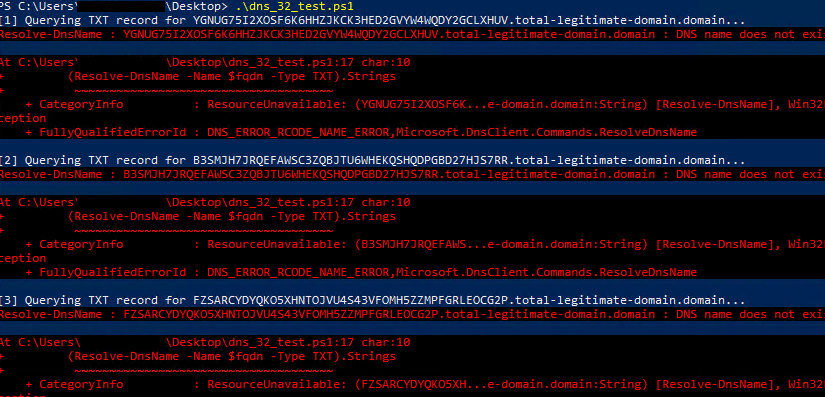
In order to test one of the DNS Tunneling attack variations, base32 encoding in FQDN, we will use the following small Powershell script to generate DNS events that emulate this attack pattern. This script calculates a base32 encoded payload for the subdomain part, constructs the subdomain and a domain of our choice and performs the DNS requests. The domain we use is a test domain that does not exist, thus we will receive only NXDOMAIN 7 responses for these requests.
$Domain = "total-legitimate-domain.domain"
$Iterations = 25

function New-Base32String {
    param([int]$Length = 45)   # 63 = DNS label max
    $base32Chars = "ABCDEFGHIJKLMNOPQRSTUVWXYZ234567".ToCharArray()
    -join (1..$Length | ForEach-Object { $base32Chars | Get-Random })
}

for ($i = 1; $i -le $Iterations; $i++) {
    $subdomain = New-Base32String -Length 45
    $fqdn = "$subdomain.$Domain"

    Write-Host "[$i] Querying TXT record for $fqdn..."

    try {
        (Resolve-DnsName -Name $fqdn -Type TXT).Strings
    }
    catch {
        Write-Warning "Query failed for $fqdn : $_"
    }

    Start-Sleep -Seconds 0   # optional delay between queries
}This script will simulate the base32 subdomain creation based on the set of characters that are used in base32 and perform batched DNS requests for the domain provided as parameter. The results observed during execution is the following:
Summary Rule Development
Unlike the previous blog of our series for Firewall log sources, as we mentioned earlier, we will propose a different approach on the Summary Rule creation. In this case, the Summary Rule will not just be used to aggregate records and store them in a new analytics table, it will be used to detect the suspicious activity in question and store the interesting information to an analytics table. After the new record is added to the analytic table, an Analytic Rule will trigger and generate the necessary alert.
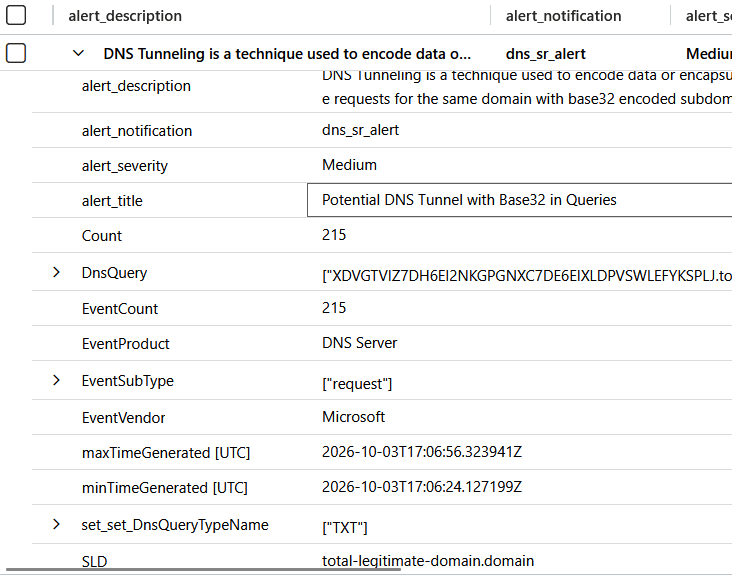
The following KQL query uses regex to match the base32 payload in the fully qualified domain name (FQDN) field of the event. Moreover, in the query we parse Top-Level and Second-Level parts of the domain to be able to use them later in aggregation. Then, by using the summarize operator8, we group the records based on the SourceIP and Second-Level part of domain that has performed these dns queries. Finally, we are checking the two threshold variables for the number of requests and the number of subdomains, since we intend to identify multiple DNS communication attempts to the same domain with different subdomains, an indicator of possible command and control communication with a specific domain. We add the columns Alert Title, Alert Description, Alert Severity, Alert Notification to enhance the title, description and severity of the future alert that will be generated by the Analytic Rule.
// Potential DNS Tunnel with Base32 in Queries
// Supported Vendor and Product: Microsoft - DNS Server
// Thresholds:
let RequestThreshold = 50;
let SubdomainThreshold = 10;
ASimDnsActivityLogs
| where EventProduct =~ 'DNS Server'
| where EventSubType in("request", "response")
| where ipv4_is_private(SrcIpAddr)
| extend TLD = tostring(split(DnsQuery, ".")[-1])
| extend SLD_part = tostring(split(DnsQuery, ".")[-2])
| where SLD_part != ""
| extend SLD = strcat(SLD_part, ".", TLD)
| where DnsQuery matches regex @"(?:^|\.)(?:[a-z2-7]{24,}|[A-Z2-7]{24,})(?:\.[A-Za-z0-9\-]+){2,}$" //Match base32 characters with high length in subdomain (at least 24 chars)
| summarize
    minTimeGenerated = min(TimeGenerated),
    maxTimeGenerated = max(TimeGenerated),
    make_set(DnsQueryTypeName, 8),
    DnsQuery = make_set(DnsQuery, 50),
    SubdomainCount = dcount(DnsQuery),
    EventCount = sum(EventCount),
    Count = count()
    by SrcIpAddr, SLD, EventSubType, EventVendor, EventProduct
| where Count >= RequestThreshold
| where SubdomainCount >= SubdomainThreshold
| summarize
    minTimeGenerated = min(minTimeGenerated),
    maxTimeGenerated = max(maxTimeGenerated),
    DnsQuery = make_set(DnsQuery, 50),
    EventSubType = make_set(EventSubType, 5),
    make_set(set_DnsQueryTypeName),
    EventCount = sum(EventCount),
    Count = sum(Count)
    by SrcIpAddr, SLD, EventVendor, EventProduct
| extend
    alert_title = 'Potential DNS Tunnel with Base32 in Queries',
    alert_description = 'DNS Tunneling is a technique used to encode data or encapsulate another communication protocol within the DNS protocol for the purpose of exfiltrating information, establishing and concealing C2 traffic, downloading tooling in compromised systems and bypassing local network security controls within the environment. A common implementation technique in DNS tunneling for passing information through DNS requests is to use a base32 encoding in the subdomains of the requested domain. Typical DNS tunneling traffic in that case will consist of multiple requests for the same domain with base32 encoded subdomains. For further information check https://www.paloaltonetworks.com/cyberpedia/what-is-dns-tunneling',
    alert_severity = 'Medium',
alert_notification = "dns_sr_alert"This query returns the following results. We can observe the sequence of requests and responses between our “compromised” host with IP Address 192.168.20.105 and the Internal DNS Server with IP Address 192.168.20.101 :

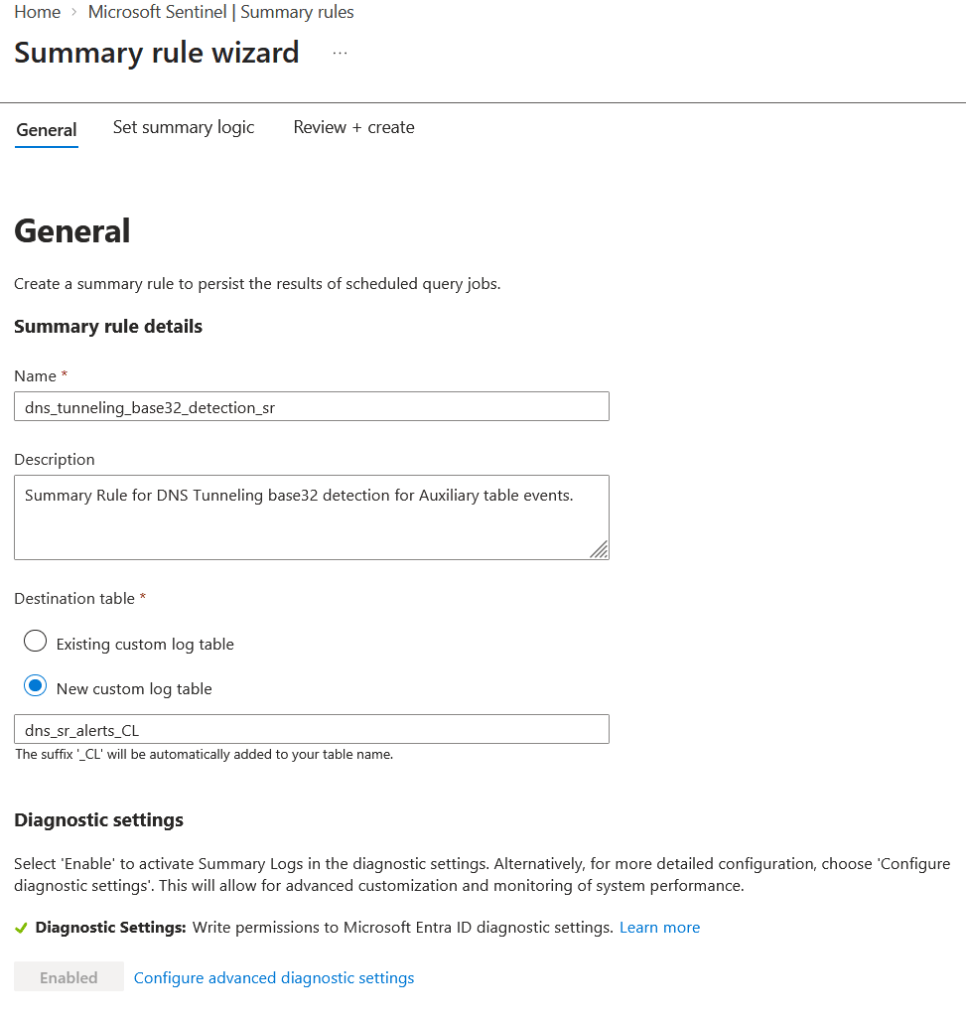
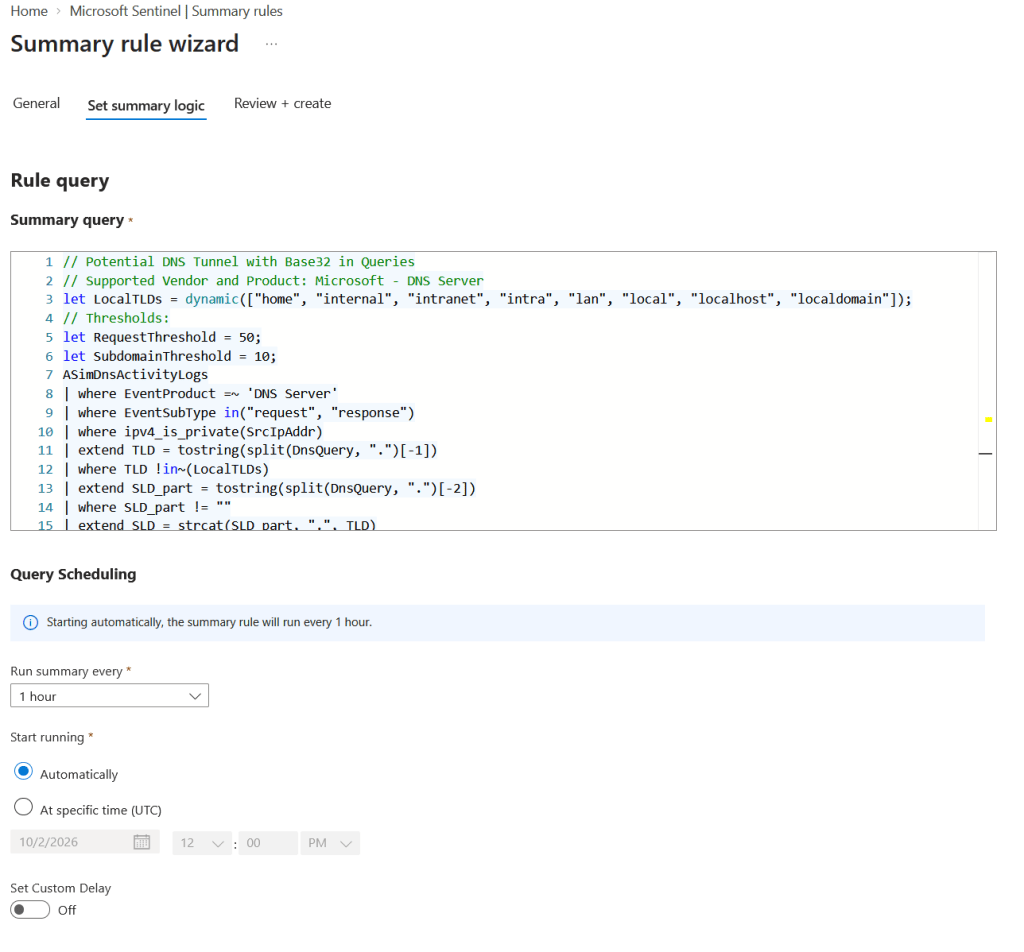
We proceed and create the Summary Rule in Microsoft Sentinel by specifying the name, description and query of the rule, the destination table that will include the results and the frequency that the rule will run. Regarding the frequency, we recommend a 1-hour interval for this rule to run. Unlike the Firewall example we provided on the previous blog, in this case, since we create the actual detection rule, which is a threshold rule, we will need a decent amount of time to gather records for the detection to run. In many cases of Command & Control, a 1-hour interval can give us enough records to hit the threshold we need. Of course, since each environment is different, these thresholds can be set lower accordingly, and as a result, making the rule more sensitive.This requires a baseline configuration for each organization.
Analytic Rule Development
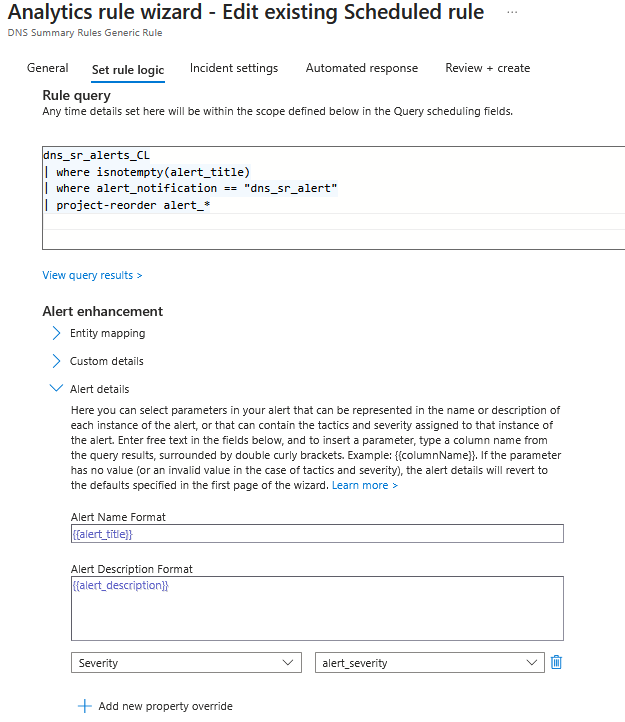
Now that we have the newly created Summary Rule in place, we need to be able to trigger an alert each time a new record is populated. To do this, we will create an Analytic Rule that will handle the results of the Summary Rule. In this Analytic Rule’s query we check the records from the table dns_sr_alerts_CL and the field alert_notification. If there is a match, an alert will trigger that has the Alert Title, Alert Description and Alert Severity preset by the Summary Rule’s query. Using this we are able to create multiple Summary Rules and a singly Analytic Rule that handles the results based on the field’s information.
dns_sr_alerts_CL
| where isnotempty(alert_title)
| where alert_notification == "dns_sr_alert"
| project-reorder alert_*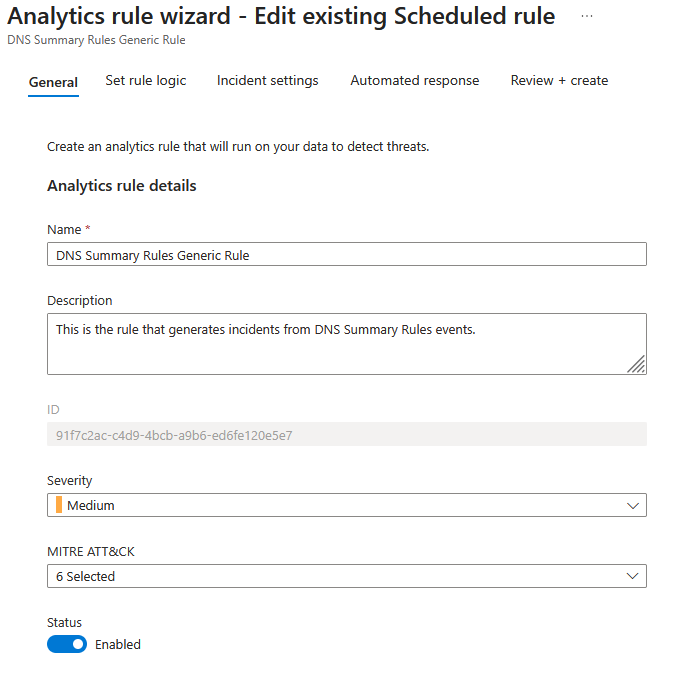
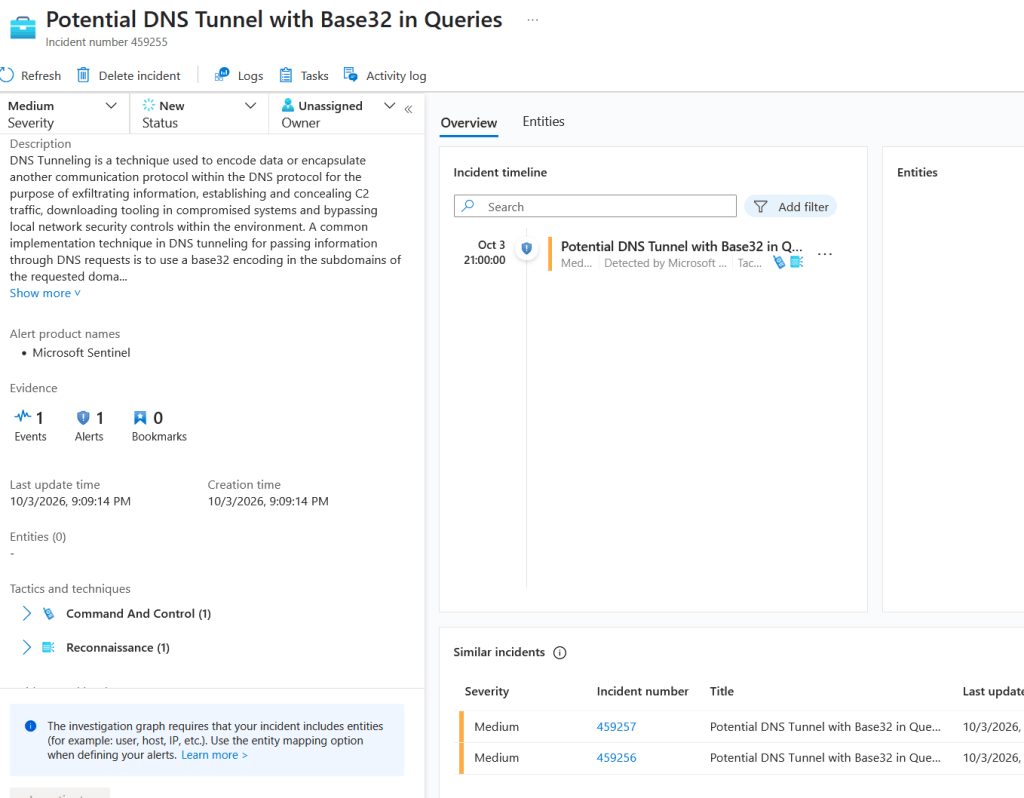
The screenshot below demonstrates the incidents generated by the Analytic Rule we created.
Cost Comparison
Based on the presented solution and our internal assessments across multiple clients’ environments, this approach can reduce the cost of ingesting DNS events by roughly 95% compared to the original ingestion cost. In some cases, the cost reduction is even higher. The cost reduction is greater than outlined in our previous blog post because the detection logic is applied to the Summary Rule. As a result, the analytics table stores only the records generated for alerting through the Analytic Rule, rather than the actual DNS records. In addition to ingestion costs, each execution of the Summary Rule incurs a query cost based on its configured interval for the data that are scanned. However, according to our internal assessments, the average cost per execution remains relatively low. As we mentioned on the previous blog, to better estimate projected costs for your specific environment, use Microsoft’s Sentinel Cost Estimator app9 or calculate based on Microsoft’s Sentinel pricing listings10.
Wrapping Up
In the third part of this blog series, we demonstrated an alternative way to use Microsoft Sentinel Summary Rules on Microsoft DNS Analytic events to reduce ingestion costs while preserving the critical visibility required for effective threat detection and incident response. The demonstrated approach is applied to Microsoft DNS Analytic events but can be extended to additional DNS products based on each environment’s requirements.
References
- Extrahop, “What is C2 Beaconing? Definition & Prevention”. Available: https://www.extrahop.com/resources/attacks/c-c-beaconing ↩︎
- Microsoft, “What is Microsoft Sentinel data lake?”. Available: https://learn.microsoft.com/en-us/azure/sentinel/datalake/sentinel-lake-overview ↩︎
- Palo Alto Networks, “What Is DNS Tunneling?”. Available: https://www.paloaltonetworks.com/cyberpedia/what-is-dns-tunneling ↩︎
- Wikipedia, “Base32 Encoding”. Available: https://en.wikipedia.org/wiki/Base32 ↩︎
- Github, “Sliver C2 Framework”. Available: https://github.com/bishopfox/sliver ↩︎
- Microsoft, “DNS Analytical Event Logging”. Available: https://learn.microsoft.com/en-us/windows-server/networking/dns/dns-logging-and-diagnostics ↩︎
- Cloudns, “What is NXDOMAIN?”. Available: https://www.cloudns.net/blog/what-is-nxdomain/ ↩︎
- Microsoft, “summarize operator”. Available: https://learn.microsoft.com/en-us/kusto/query/summarize-operator ↩︎
- Microsoft, “Microsoft Sentinel cost estimator”. Available: https://www.microsoft.com/en-us/security/pricing/microsoft-sentinel/cost-estimator ↩︎
- Microsoft, “Microsoft Sentinel pricing”. Available: https://www.microsoft.com/en-us/security/pricing/microsoft-sentinel/#section-master-oc2d43 ↩︎